
Kinnser Login
Everything home health and hospice staff need to sign in to the Kinnser portal — now WellSky Home Health — in one place. Sign in, reset your password, or fix a login problem.
Official login URL: www.kinnser.net · Agency-issued accounts · No self-registration
Login | WellSky HHH
This is what the official sign-in page looks like.
Log in at kinnser.net ↗Forgot Password or Unlock Account
Preview only — this form doesn’t sign you in. Enter your credentials only on the real page at www.kinnser.net.
✓ Verified against official WellSky pages · kinnser.net · status.home.wellsky.com · Last updated November 14, 2026
⚠ Warning: homehealth.wellsky.com is NOT the login page
That address shows a placeholder page, not a sign-in form. The real login is www.kinnser.net. Always check the address bar before typing your credentials — fake healthcare login pages are a real phishing risk. Never sign in from a link in an unexpected email or text, and always log out on shared computers.
Login Troubleshooter
Pick the problem that matches yours — the fix is below.
Wrong password
- Retype it once, slowly. Usernames and passwords are case-sensitive — check Caps Lock is off, and make sure no extra space slipped in at the start or end.
- Don’t keep guessing. Repeated failed attempts can lock your account.
- Use the reset link. On www.kinnser.net, click “Forgot Password or Unlock Account” below the Username and Password fields and follow the on-screen prompts.
- If the reset email never arrives: check your spam/junk folders, confirm the email your agency has on file, then contact your agency administrator — they can reset your password directly, usually faster than self-service. You can also call WellSky support at 877-399-6538 (Mon–Fri, 7 AM–7 PM CT).
Account locked
If you see this message, your account is locked:
“Your account has been locked due to the number of failed login attempts…”
- Stop guessing passwords. Every extra failed attempt can extend the lockout.
- Try the unlock link. Go to www.kinnser.net and click “Forgot Password or Unlock Account”, then follow the on-screen prompts.
- Contact your agency administrator. Your system admin can verify your identity and unlock the account directly — the fastest reliable path.
WellSky does not publish an official lockout policy — the exact number of failed attempts and the lockout duration are not stated anywhere official, so don’t trust any guide quoting specific numbers.
Page won’t load
- Check the status page first. Open status.home.wellsky.com — if an incident is posted, the problem is on WellSky’s side; the only fix is to wait for the all-clear.
- Check your connection, then clear your browser cache and cookies, close the browser completely, and try again.
- Try an incognito/private window — if it works there, an extension or cached file was the problem.
- Use an up-to-date browser — the latest Chrome, Edge, or Firefox.
- Confirm the address: the login page is www.kinnser.net. If you landed on homehealth.wellsky.com, that’s a placeholder page, not a login.
Don’t know my username
Usernames are assigned by your agency — there is no self-service username lookup.
- Contact your agency administrator or IT team — they can confirm or reset your username.
- Make sure you’re using the username your agency issued, not your email address — they’re often different.
- If your whole agency’s access looks wrong, your administrator (not WellSky’s general line) is the one who can fix it — the portal itself says “Ask your system admin for a login.”
Kinnser Login Guides
Short answers here — full step-by-step guides on each topic.
Kinnser Login: Official Portal Guide
The only official login page is www.kinnser.net. Sign-in steps, screenshots, and the placeholder page to avoid.
How to Sign In, Step by Step
- Open the portal — go to www.kinnser.net in Chrome or Edge. Bookmark it for next time.
- Enter your username — the one your agency admin gave you. Usernames are case-sensitive.
- Enter your password — check that Caps Lock is off before submitting.
- Click Log In.
- Open your dashboard — schedules, charts, and documentation await.
How to Reset Your Kinnser Password
Forgot your password? Reset it from the official login page in six steps — no call, no new account.
How to Unlock Your Kinnser Account
Locked out after too many failed attempts? Only your agency admin can unlock it — here’s what to say and who to call.
Kinnser Login Not Working? Fixes That Work
Wrong page, wrong password, locked account, or a real outage — pick your symptom and fix it in under a minute.
Kinnser Mobile Login: Point of Care App
The Scribe app is now WellSky Point of Care. Same login, same credentials — here’s how to sign in on your phone.
What Is Kinnser Software?
Kinnser is now WellSky Home Health. What it does, who uses it, and the 2003–2018 story in plain language.
Kinnser Support: Phone, Email & Hours
Phone 877-399-6538, email homehealth.support@wellsky.com, Mon–Fri 7AM–7PM CT — and what to have ready before you call.
Kinnser Training & Tutorials
The WellSky Learning Center: OASIS, ICD-10, case management, and the HOPE Tool certificate — plus what to learn first.
Kinnser vs WellSky: What Changed?
Kinnser became WellSky in 2018. What changed, what stayed the same, and what the 2026 app switch means.
WellSky HHH Login Guide
HHH means Home Health and Hospice. One portal serves Home Health, Hospice, and Therapy — here’s how to sign in.
Forgot Your Kinnser Username?
There’s no self-service username recovery — only your agency admin can look it up. Here’s what to ask for.
Is Kinnser Down?
Check the official status page in ten seconds — and tell an outage from a login problem before you call anyone.
Login Screenshots
See each step of the sign-in — tap any image to enlarge it.
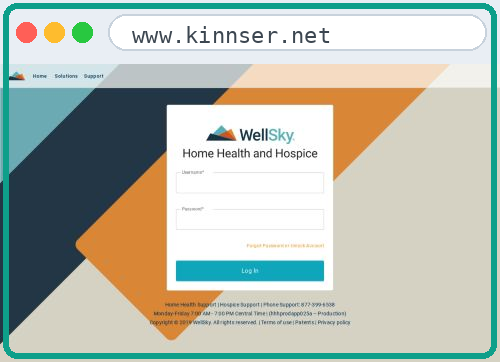
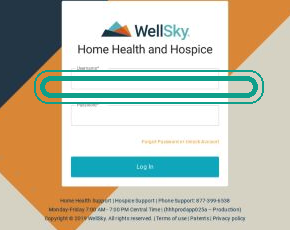
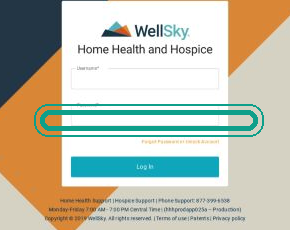
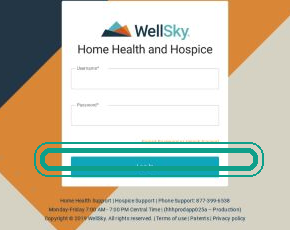
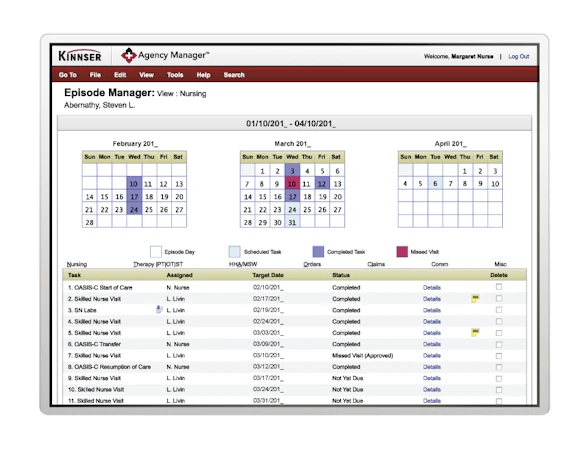
Scroll sideways to see all five steps — tap an image to open it larger.
WellSky Point of Care App
The official mobile app is WellSky Point of Care for iPhone and Android. It replaced the WellSky Scribe app at the May 28, 2026 launch — if you had Scribe, it updated automatically; check your home screen. Update it, don’t reinstall it.
Sign in with the same username and password you use on the web portal. The app includes point-of-care documentation and SkySense AI assistance, and supports offline documentation that syncs when you’re back online.
Download: search “WellSky Point of Care” in the Apple App Store or Google Play and confirm the developer is WellSky. (Store links to be added once the official listings are verified — no store URLs guessed here.)
Is Kinnser down?
Check status.home.wellsky.com — WellSky’s official status page for Home Health and Hospice, with current incidents and scheduled maintenance. If an incident is already posted, support already knows — the fix is to wait for the all-clear.
Kinnser Login FAQs
Quick answers to the most common questions — all visible, no clicking needed.
What is the official Kinnser login website?
www.kinnser.net (titled “Login | WellSky HHH”).
Can I create my own Kinnser account?
No. Accounts are created by your home health or hospice agency. If you work for an agency that uses Kinnser/WellSky, ask your administrator for login credentials.
Where is the password reset link on the Kinnser login page?
It’s labeled “Forgot Password or Unlock Account” and sits below the Username and Password fields on www.kinnser.net.
I never got the reset email. What now?
Check spam/junk folders, confirm your username and the email on file, then contact your agency administrator — they can reset your password directly. You can also call WellSky at 877-399-6538 (Mon–Fri, 7 AM–7 PM CT).
How many failed attempts lock a Kinnser account?
WellSky does not publish this number, and we won’t guess. Just know repeated wrong passwords can trigger a lockout — reset instead of guessing.
What is the official Kinnser mobile app called?
WellSky Point of Care — for iPhone and Android. It replaced the WellSky Scribe app at the May 28, 2026 launch.
Why does the login page say “WellSky HHH”?
HHH stands for Home Health and Hospice — WellSky’s name for the combined platform the Kinnser portal became.
I forgot my username. What do I do?
Usernames are assigned by your agency — there is no self-service username lookup. Contact your agency administrator or IT team; they can confirm or reset it for you.
No FAQ matches your search — try different words, or start with the troubleshooter above.
More questions? Each guide above has its own FAQ section — start with the troubleshooter if your login isn’t working.
Ready to Sign In?
Head to the official Kinnser login portal. Keep this guide bookmarked for password help and troubleshooting.